Skip to content

Client

Create an XMTP client to connect an identity to your backend and keep its local messaging state.

When you call Client.create(), the following steps happen under the hood:

  1. The client asks the signer for its identifier.
  2. It looks up the inbox ID registered for that identifier on your backend. The inbox ID is the user’s identity.
  3. It opens or creates the local database for that inbox and installation.
  4. It registers a new installation when needed.

Generate a secure 32-byte encryption key and store it so the app can use the same key on every launch. If the key changes or is lost, the client creates a new installation and cannot read the former local database.

dbEncryptionKey and the database path decide whether a client reopens its installation. If either changes, the client creates a new installation without reporting that the old installation was replaced. The new installation needs a signature and counts against the limit of 10.

Store the key and path as durable app state. Keep the same env value because it selects the default file name. An agent deployment must mount durable storage for XMTP_DB_DIRECTORY.

Database encryption key loss during iOS device transfers

Section titled “Database encryption key loss during iOS device transfers”

When you transfer data to a new iOS device, the local database file may be moved without the encryption key, causing decryption errors. This commonly occurs when users choose Apple’s direct transfer option during new device setup, as Apple aggressively moves files to the new device. To prevent this issue, exclude the database directory from backups and device transfers.

For example, if you set a custom dbDirectory to a known directory, you can mark it as excluded from backups in iOS:

func addSkipBackupAttribute(folder: URL) throws {
var folder = folder
var values = URLResourceValues()
values.isExcludedFromBackup = true
try folder.setResourceValues(values)
}

To learn more about this function, see isExcludedFromBackupKey in Apple’s documentation.

For debugging, it can be useful to decrypt a locally stored database. When a dbEncryptionKey is used, the XMTP client creates a SQLCipher database which applies transparent 256-bit AES encryption. A .sqlcipher_salt file is also generated alongside the database.

To open this database, you need to construct the password by prefixing 0x (to indicate hexadecimal numbers), then appending the encryption key (64 hex characters, 32 bytes) and the salt (32 hex characters, 16 bytes). For example, if your encryption key is A and your salt is B, the resulting password would be 0xAB.

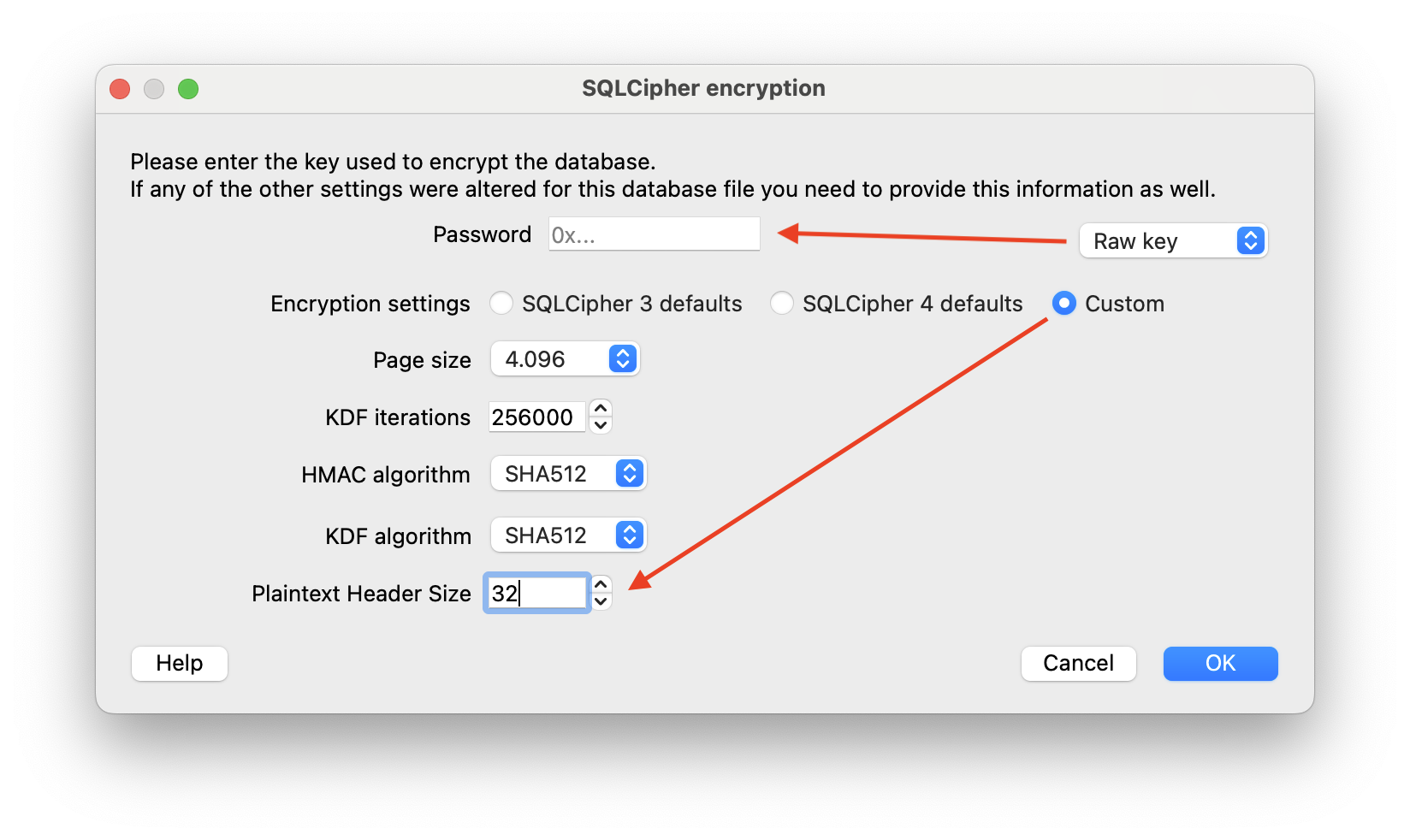
The database also uses a plaintext header size of 32 bytes.

If you want to inspect the database visually, you can use DB Browser for SQLite, an open source tool that supports SQLite and SQLCipher. In its Custom encryption settings, set the Plaintext Header Size to 32, and use the full Password as a Raw key:

DB Browser for SQLite

PRAGMA key or salt has incorrect value means the supplied encryption key does not match the database. It can also mean that the file is not an XMTP database. Do not replace the stored key automatically, because that creates another installation.

Client.create() takes a signer and a backendUrl. The remaining options are optional except for the database encryption key on Kotlin and Swift.

const
const client: Client<BuiltInContentTypes>
client
= await
class Client<ContentTypes = BuiltInContentTypes>

Client for interacting with the XMTP network

Client
.
Client<ContentTypes = BuiltInContentTypes>.create<[]>(signer: Signer, options: (Omit<NetworkOptions & DeviceSyncOptions & ContentOptions & StorageOptions & OtherOptions, "codecs"> | Omit<{
backend: Backend;
} & DeviceSyncOptions & ContentOptions & StorageOptions & OtherOptions, "codecs">) & {
codecs?: [] | undefined;
}): Promise<Client<BuiltInContentTypes>>

Creates a new client instance with a signer

@paramsigner - The signer to use for authentication

@paramoptions - Optional configuration for the client

@returnsA new client instance

create
(
signer: Signer
signer
, {
backendUrl: string

Backend URL, including the HTTP or HTTPS scheme.

backendUrl
: "https://xmtp.example.com",
});
OptionDefaultPurpose
backendUrlRequiredFull HTTP or HTTPS URL of your backend
envlocal on mobile; unset in JavaScriptLabel used in the default database file name
appVersionUnsetApp name and version sent with each request
dbEncryptionKeyRequired on mobile32-byte database key; Browser ignores it
dbPathUnsetNode path, null, or an inbox-ID callback; Browser path or null
dbDirectoryUnsetKotlin and Swift database directory
codecsEmptyExtra content-type codecs
disableDeviceSyncfalseBrowser and Node device-sync switch
deviceSyncEnabledtrueKotlin and Swift device-sync switch
disableAutoRegisterfalseSkip automatic identity registration
nonce1Node-only inbox derivation nonce
structuredLoggingfalseJavaScript JSON logging
loggingLevelUnsetJavaScript log level
preAuthenticateToInboxCallbackUnsetCallback before a mobile identity signature request
waitForRegistrationVisibleUnsetWait until registration can be read from the backend
maxDbPoolSize, minDbPoolSize, useSingleConnectionSDK defaultsDatabase connection tuning
workerConfig, forkRecoveryOptions, unstableChangeCallbacksSDK defaultsAdvanced worker and recovery behavior
otelEndpoint, resourceAttributes, stdoutLoggingLevelUnsetTelemetry and log output
debugEventsEnabled, performanceLoggingfalseDiagnostic output

dbPath: null creates an in-memory client. A string selects that exact path. Node also accepts a callback that receives the inbox ID. Browser does not accept the callback form.

Browser and Node can take a pre-built Backend instead of inline network options. Do not pass both. createBackend takes backendUrl, env, and appVersion.

Build, or resume, an existing client (created using Client.create()) that’s logged in and has an existing local database.

For Android and iOS SDKs, when building a client with an existing inboxId, the client automatically operates in offline mode since no backend request is needed to check the identity ledger. In offline mode, the client:

  • Skips all backend requests, including preference sync and inbox validation
  • Works entirely from the local database
  • Can be synchronized later with syncAllConversations() or by recreating the client without the offline flag
const
const client: Client<unknown>
client
= await
class Client<ContentTypes = BuiltInContentTypes>

Client for interacting with the XMTP network

Client
.
Client<ContentTypes = BuiltInContentTypes>.build<ContentCodec[]>(identifier: Identifier, options: (Omit<NetworkOptions & DeviceSyncOptions & ContentOptions & StorageOptions & OtherOptions, "codecs"> | Omit<{
backend: Backend;
} & DeviceSyncOptions & ContentOptions & StorageOptions & OtherOptions, "codecs">) & {
codecs?: ContentCodec[] | undefined;
}): Promise<Client<unknown>>

Creates a new client instance with an identifier

Clients created with this method must already be registered. Any methods called that require a signer will throw an error.

@paramidentifier - The identifier to use

@paramoptions - Optional configuration for the client

@returnsA new client instance

build
(
identifier: Identifier
identifier
,
options: (Omit<NetworkOptions & DeviceSyncOptions & ContentOptions & StorageOptions & OtherOptions, "codecs"> | Omit<{
backend: Backend;
} & DeviceSyncOptions & ContentOptions & StorageOptions & OtherOptions, "codecs">) & {
codecs?: ContentCodec[] | undefined;
}
options
);

When you log a user out of your app, you can give them the option to delete their local database.

// The Browser SDK cannot delete the local database.
// This call only terminates the associated web worker.
client: Client<BuiltInContentTypes>
client
.
Client<BuiltInContentTypes>.close(): Promise<void>

Shutdown the client

close
();

In some scenarios, you may need to temporarily release the local database connection, such as when performing database maintenance or when the app goes into the background for an extended period.

Kotlin and Swift provide dropLocalDatabaseConnection() to temporarily release the connection. Browser and Node do not provide this API.

Call reconnectLocalDatabase() before another operation needs the database. Browser and Node do not provide this API. Both mobile calls are no-ops for an in-memory client.

For a file-backed client, operations that need the database fail after dropLocalDatabaseConnection() until you call reconnectLocalDatabase().